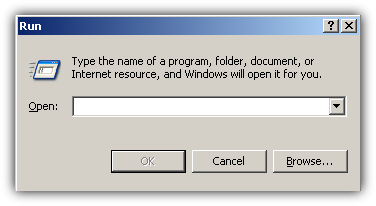
The main purpose of Windows “Run” command is to provide fast access to different applications. Knowing how to start certain applications from the “Run” line can be particularly useful if you have to work on different computers because you don't have to worry about icons, shortcuts - just type a word and start a program.
At the same time the “Run” box remains one of the most neglected Windows functions. Mainly because people just don't know what it does. That's when it's time to consult the rookie journal.
In order to open the run command press Win Key + R at the same time.
This box will appear.
Note: You can also start the Run command from the start menu but sometimes when you have to work on different workstations the Run icon might be removed. That's why Rookie Journal recommends the use of the hotkey combination showed above - it just works every time.
Ok. Now the Run command is waiting for your orders. Here is a list containing the most useful Windows run commands.
|
Command |
Function |
|
|
|
|
mspaint |
Opens Paint |
|
calc |
Opens calculator |
|
explorer |
Opens Windows explorer |
|
notepad |
Opens notepad |
|
write |
Opens Wordpad |
|
cmd |
Opens the Command Prompt in Windows |
|
control |
Opens control panel |
|
fonts |
Opens fonts folder |
|
control mouse |
Opens mouse properties |
|
chkdsk |
Startsa the checkdisk utilities |
|
clipbrd |
Starts the clipboard viewer |
|
sol |
Opens the Solitaire game in Windows |
|
regedit |
Opens the registry editor |
|
msconfig |
Opens the System Configuration Utility |
|
cleanmgr |
Opens disk clean-up |
|
control desktop |
Opens display properties |
|
telnet |
Opens the telnet client |
|
taskmgr |
Opens task manager |
|
services.msc |
Opens services |
|
wscui.cpl |
Opens security center |
|
devmgmt.msc |
Opens device manager |
|
diskmgmt.msc |
Opens Disk Management |
|
printers |
Opens the printers folder |
|
logoff |
Log Out Of Windows |
cmd, chkdsk, msconfig...etc.
Add Flavor Your Workflow: Basic Windows Run Box Commands
You might also like...