How To Kill Any Memory Hungry Process Using Process Hacker
Added On August 25, 2011
Process Hacker is a powerful feature-packed tool for manipulating processes and services on your computer. The key features of the program are:
• A simple, customizable tree view with highlighting showing you the processes running on your computer.
• Detailed system statistics with graphs.
• Advanced features not found in other programs, such as detaching from debuggers, viewing GDI handles, viewing heaps, injecting and unloading DLLs, and more.
• Powerful process termination that bypasses security software and rootkits.
• View, edit and control services, including those not shown by the Services console.
• View and close network connections.
• Starts up almost instantly, unlike other programs.
Official web-page: http://processhacker.sourceforge.net/
Here's how simple it is to kill a process using Process Hacker.
Step 1: Download and Start Process Hacker
Step 2: Found a ProcessThat You Would Like To Terminate
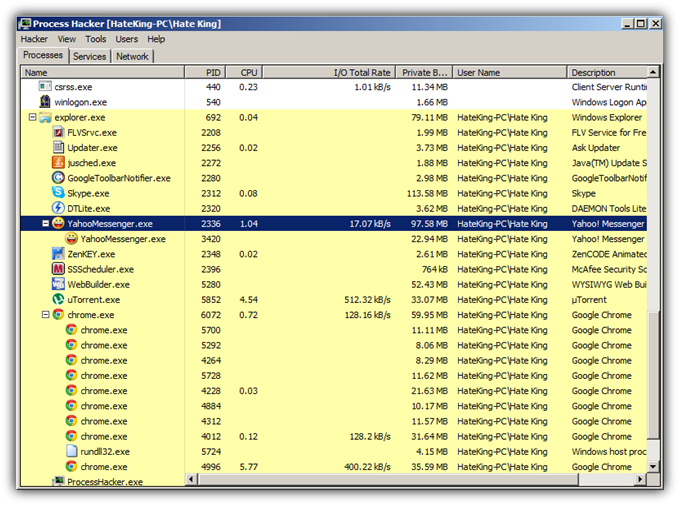
In my case I would like to terminate my Yahoo Messenger since the program is using too much of my Internet Power as shown by Process Hacker.
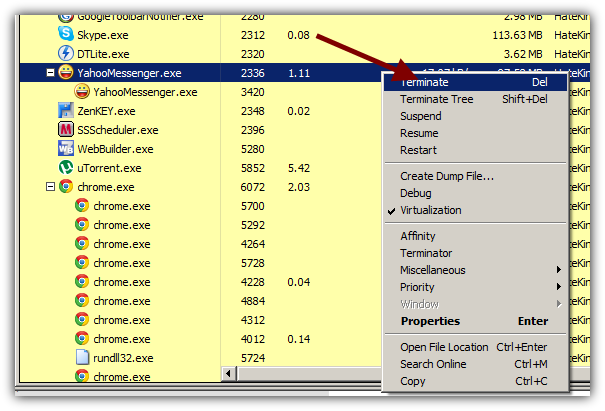
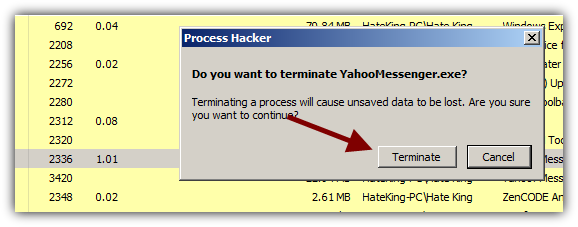
Once you've found a memory hungry process right-click on it and Choose Teminate.
That's it. You just killed a process. However keep in mind that if the process is part of your start-up programs list you will have to delete or disable the program from running every time you start your PC. Click here to see how it's done.
As you can see Process Hacker is much more powerful task explorer than the build in Task Manager in Windows 7. So the next time yout computer crashes and the task manger refuse to kill the problematic process just use Process Hacker.
You might also like...